


SA2633 MEASUREMENT SOFTWARE
V1.01 Jul 14, 2023
- If you are unable to download software, please check the following:
- Please register a my HIOKI account and then use it to log in to the my HIOKI service.
| Software (setup_SA2633 MEASUREMENT SOFTWARE_V1.01.0.0.zip) |
|---|

○ Latest software is posted. Keep the instruction manual up-to-date.
○ Do not perform the following operations during the upgrade. Repair is required.
・ Turn off the main unit.
・ Remove the media.
About SA2633 MEASUREMENT SOFTWARE
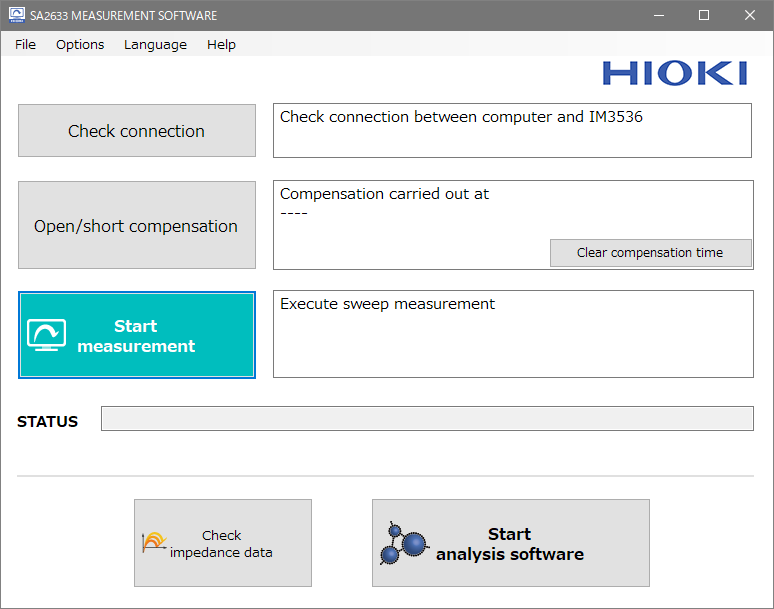
The SA2633 Measurement Software is used to acquire data for SA2632 Analytical Software.
Using the IM3536(-01) LCR Meter and SA2633 Measurement Software together allows you to easily acquire data for slurry analysis.
Specifications
* Instrument to be controlled
- IM3536 LCR Meter
- IM3536-01 LCR Meter
* Supported interfaces
- RS-232C
- USB (virtual COM)
- LAN (socket communication)
* Compensation function
- Performs open compensation and short compensation for the instrument to be controlled from the software.
* Measurement start and stop
- Performs frequency sweep measurement of the instrument to be controlled under the fixed conditions from the software,
and saves the measurement results.
* Measurement data save function
- Outputs the measured impedance data in the file format that can be loaded using the SA2632 Analytical Software.
* Measurement time
- Approx. 1 minute
* System requirements
- Memory: 512 MB or more
- Hard disk: 1 GB or more of available space
- Display: 1,024 × 768 dots or more, 65,536 colors or more
- Interface: USB 2.0 or more to be installed
- OS: Windows 8.1 (32-bit/64-bit), Windows 10 (32-bit/64-bit), Windows 11 (64-bit)
- .NET Framework: 4.7.2
Version Upgrade History
V1.01 (July 2023)
- Added Chinese display function
V1.00 (June 2022)
- First release
Operating Environment
- Memory: 512 MB or more
- Hard disk: 1 GB or more of available space
- Display: 1,024 × 768 dots or more, 65,536 colors or more
- Interface: USB 2.0 or more to be installed
- OS: Windows 8.1 (32-bit/64-bit), Windows 10 (32-bit/64-bit), Windows 11 (64-bit)
- .NET Framework: 4.7.2
Precautions
- When using USB, it is necessary to install a device driver. For details, please refer to the instruction manual of each product.
- To use the latest version of the check function, an Internet connection is required.