


MEMORY HiLOGGER LR843x
V1.12 Nov 05, 2025
- If you are unable to download software, please check the following:
- Please register a my HIOKI account and then use it to log in to the my HIOKI service.
| Firmware (LR8431V112.zip) | |
|---|---|
| Procedure on how to update the firmware (LR8431-20VupProcedures.pdf) |


Version upgrade should be conducted by a qualified technician familiar with the functions and operations of Model LR843x.
If you are uncertain as to how to proceed, please contact your local HIOKI distributor for assistance.
・All software provided here is freeware and the best version currently available.
・If the problems or errors during this download and install lead to malfunction, please contact your dealer or Hioki representative.
・The ownership, intellectual right and all other associated rights relating to the software provided here belong to HIOKI E.E. CORPORATION.
If you have read and understand the information above and wish to proceed then please download the designated files.
As for version upgrade procedure, please download ”Procedure on how to update the firmware” which describes the preparation and procedure for upgrading firmware after downloading the files.
Precaution when updating software:
・During the version upgrade process, DO NOT turn off the power to the LR843x or remove the PC card or USB memory stick from the slot. Turning power off will result in failure to upgrade the LR843x and the instrument must be returned to the HIOKI factory for repair.
・To conduct the version update, a USB Memory Stick or HIOKI-issued PC Card is required.
Software for the Model LR843x
The current newest software versions are shown below. A version update is highly recommended if you are running older software.
Firmware Version :V1.12
Before you proceed
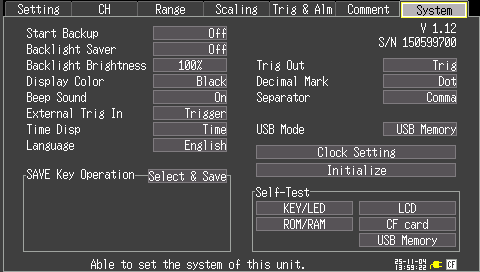
・Check the version number by accessing the SYSTEM tab on your HiLOGGER. The version number is located on the top right corner of the screen
・If the version number on your Model LR843x is Ver 1.12, there is no need to upgrade your instrument. A version update is highly recommended for all LR843x′s operating with firmware that is earlier than the newest version.
・To download the file, it is necessary to register your customer information as well as serial number(s) of your Model LR843x.
Version Upgrade History
V1.12 (November 2025) Newest Version
Improved:
1.Updated the corresponding USB device driver to enable USB communication even when the memory integrity is enabled in the Windows 11 or 10 settings.
2.Fixed the 20V range so that the measurement values are displayed only up to the digit of the minimum resolution.
ATTENTION:
1.Please ALSO UPDATE the Logger Utility (SF1000) to the latest version (V2.00 or later). If the Logger Utility is not updated to the latest version (below V2.00), USB communication with LR843x V1.12 will NOT be possible.
V1.11 (August 2015)
Resolved bugs:
1.Fixed trigger mark display when loading the MEM file.
2.When CSV save, it was fixed header description of the scaling conversion ratio of the pulse channel.
V1.02 (November 2013)
Resolved bugs:
1. Add a weight to the process when you insert a CF card, CF card of some hard to recognize now being recognized.(Even when difficult to recognize, it is recognized to be re-inserted into the CF card in a little early action.)
Improved:
1.When real-time split save, not the folder of date with reference to the time on the clock, it was changed to save it to a folder of the date with reference to the record time of measurement data.