


RGB laser measuring instrument Application Disc
Rev2 Oct 01, 2018
- If you are unable to download software, please check the following:
- Please register a my HIOKI account and then use it to log in to the my HIOKI service.
| Application Disc (TM610x_ApplicationDiscRev2.zip) |
|---|

This download file includes the following items.
● Instruction Manual (Communication)
● RGBLaserUtility (Application Software)
● Sample Project
● User’s License Agreement
Specifications
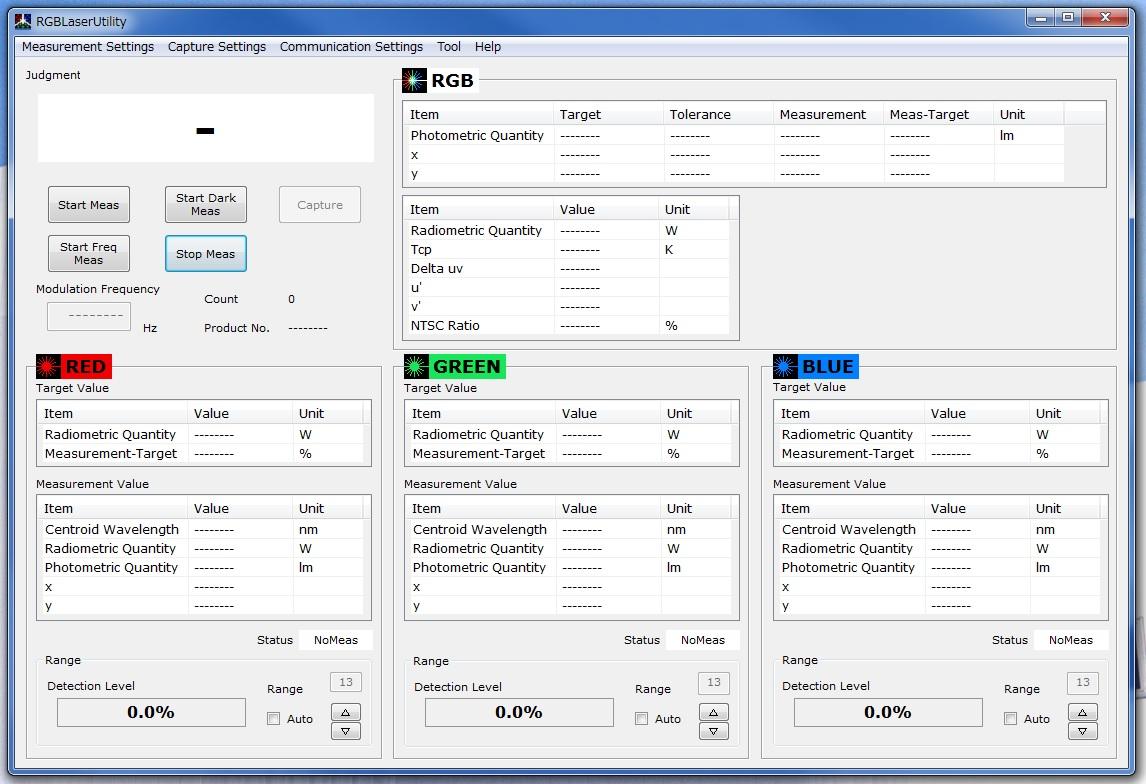
The RGBLaserUtility is used for basic measurement with TM6102, TM6103, TM6104.
The RGBLaserUtility can use the following functions.
● Measuring the basic parameters of lasers such as the centroid wavelength and radiometric quantity
● Measuring the chromaticity, photometric quantity and other parameters related to the color of laser displays
● Modulated light measurement
● White balance adjustment assistance function
Installation
1. If .Net Framework 4.0 or newer is not installed in your PC, please install it.
2. Click [Download] to download the file.
3. Execute X: \RGBLaserUtility\Setup.msi (X indicates the folder in which the downloaded file is stored.)
4. Complete installation following the instructions on the screen.5. Double-click [RGBLaserUtility] on the desktop.
User Interface
Version Upgrade History
Rev2 (October 2018)
The instruction manual for communication was revised.
Rev1 (July 2017)
First release
Operating Environment
Windows 7(32-bit or 64-bit), Windows 8(32-bit or 64-bit), Windows 10(32-bit or 64-bit)