


MEMORY HiLOGGER LR8450, LR8450-01
Main Unit V3.01 / Plug-in Module V1.30 / Wireless Module V1.60 May 19, 2026
- If you are unable to download software, please check the following:
- Please register a my HIOKI account and then use it to log in to the my HIOKI service.
| Main Unit Firmware [For V3.00 or Later] (LR8450V301.zip) | |
|---|---|
| Main Unit Firmware [For V2.22 or earlier] (LR8450V300.zip) | |
| Main Unit Boot Loader (LR8450BOOTREV4.zip) | |
| Wireless Input Module Firmware (LR8530V160.zip) | |
| Plug-in Input Module Firmware (U8550V130.zip) | |
| How to update the Firmware (LR8450s_Vup_E.pdf) |


-Important-
If you are using main unit firmware version V2.22 or earlier, a two-step update is required.
Please follow the steps below to update the firmware.
1. First, download the "Main Unit Firmware [for V2.22 or earlier]" and update to version V3.00.
2. Next, download the "Main Unit Firmware [for V3.00 or later]" and update to the latest version.
・All software provided the best version currently available.
・If the problems or errors during this download and install lead to malfunction, please contact your dealer or Hioki representative.
・The ownership, intellectual right and all other associated rights relating to the software provided here belong to Hioki E.E. Corporation.
If you have read and understand the information above and wish to proceed then please download the designated files.
As for version upgrade procedure, please download "Procedure on how to update the firmware" which describes the preparation and procedure for upgrading firmware after downloading the files.
Precaution when upgrading firmware:
・To conduct the version upgrade, Hioki genuine USB memory stick or SD card is required.
・During the version upgrade process, don't turn off the power to the instrument or remove the storage media from the slot. Turning power off will result in failure to upgrade the instrument, and the instrument must be returned to the Hioki factory for repair.
About Firmware
The current newest firmware versions are shown below. A version upgrade is highly recommended if you are running older firmware.
・Main Unit Firmware : V3.01
・Main Unit Boot Loader : Rev.4
・Plug-in Module Firmware : U8550-U8554/U8556-U8557 V1.30, U8555 V1.10
・Wireless Module Firmware : V1.60
* CAN Unit U8555 and LR8535 are supported with firmware V2.00 or later.
* Current Module U8556 and LR8536 are supported with firmware V2.20 or later.
* Thermistor Module U8557 and LR8537 are supported with firmware V3.00 or later.
* When using a Wireless Module with Wireless LAN Adapter Z3231 installed, firmware V2.21 or later is required for the main unit.
* Wireless module firmware V1.50 or later is required to connect Wireless LAN Adapter Z3231 to the Wireless Module.
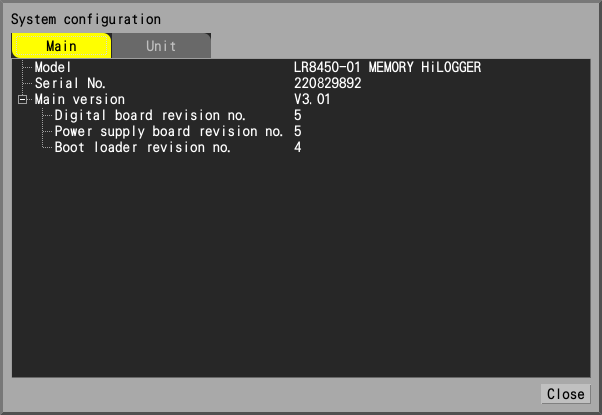
How to check the version number
The firmware version is displayed in the window that appears when you select "System config..." in the "System" - "Environment" screen.
Main Unit Upgrade History
V3.01 (May 2026)
Resolved bugs
1. Fixed an issue where the input type of all channels of VOLTAGE/TEMP UNIT and STRAIN UNIT is set to "Voltage" when sending settings or starting a measurement from the Logger Utility.
2. Fixed an issue where the measurement value (temperature converted value) of the LR8537 WIRELESS THERMISTER MODULE would sometimes be inaccurate.
V3.00 (March 2026)
Improvement
1. Supports Thermistor Module U8557 and Wireless Thermistor Module LR8537.
2. Supports GENNECT Space.
3. Minor functional improvements have been made.
Resolved bugs
1. Minor bugs were fixed.
V2.22 (June 2025)
Improvement
1. Minor functional improvements have been made.
Resolved bugs
1. Minor bugs were fixed.
V2.21 (July 2024)
Improvement
1. Sampling correction function is now supported.
2. Other functional improvements have been made.
Resolved bugs
1. Minor bugs were fixed.
V2.20 (Octorber 2023)
Improvement
1. GENNECT Cloud linking function is now supported.
2. Other functional improvements have been made.
Resolved bugs
1. Minor bugs were fixed.
V2.12 (March 2023)
Improvement
1. Boot loader can now be upgraded.
V2.11 (Febrary 2023)
Resolved bugs
1. Fixed a problem in which the status bar display contents and SAVE LED would remain in the real-time saving state when real-time saving was aborted due to low battery power during real-time saving.
2. Minor bugs were fixed.
Improvement
1. Other functional improvements have been made.
V2.10 (August 2022)
Improvement
1. Synchronous operation function is now supported.
2. FTPS is now supported. (FTP data auto send function)
3. Other functional improvements have been made.
Resolved bugs
1. Minor bugs were fixed.
V2.00 (December 2021)
Improvement
1. Supports CAN UNIT U8555 and WIRELESS CAN UNIT LR8535.
2. Measurement data can be saved in MDF format.
3. Added the function to start / stop the measurement at the specified time.
4. Supports SMTPs and STARTTLS. You can send an email to Gmail, iCloud, etc.
5. Added the XCP on Ethernet function.
6. Other functional improvements have been made.
Resolved bugs
1. Minor bugs were fixed.
V1.51 (May 2021)
Improvement
1. The setting copy function has been improved.
2. The function to assign the waveform display position at equal intervals has been added.
3. Other functional improvements have been made.
Resolved bugs
1. Minor bugs were fixed.
V1.50 (Jan 2021)
Improvement
1. The function of saving the segmented data based on the reference time has been added.
2. The X-Y composition function was added.
3. Added the function of sending e-mail.
4. Other functional improvements have been made.
Resolved bugs
1. Minor bugs were fixed.
V1.21 (August 2020)
Improvement
1. Added the USB keyboard layout setting.
2. Other functional improvements have been made.
Resolved bugs
1. Minor bugs were fixed.
V1.20 (May 2020)
Improvement
1. Supports wireless input modules LR8530, LR8531, LR8532, LR8533, LR8534 (LR8450-01 only).
2. Supports Chinese and Korean display.
Resolved bugs
1. Minor bugs were fixed.
V1.11 (April 2020)
Improvement
1. The Logger Utility can be used to collect real-time data at recording intervals of 10ms to 50ms.
Resolved bugs
1. The response of the following communication commands may not be correct.
:MEMORY:AREAL?, :MEMORY:VREAL?, :MEMORY:TAREAL?,
:MEMORY:TVREAL?, *STB?, *ESR?, :ESR0?
2. Other minor bugs were fixed.
Boot Loader Upgrade History
Rev.4 (March 2023)
Resolved bugs
1. Fixed a problem in which, in rare cases, the LEDs would light up but the screen would remain black and not boot properly when power was turned on.
Wireless Input Module Upgrade History
V1.60 (March 2026)
Improvement
1. Wireless Thermistor Module LR8537 is now supported.
V1.52 (June 2025)
Improvement
1. Minor functional improvements have been made.
V1.51 (March 2025)
Improvement
1. Minor functional improvements have been made.
V1.50 (November 2024)
Improvement
1. Wireless LAN Adapter Z3231 is now supported.
V1.07 (September 2023)
Improvement
1. Wireless Current Module LR8536 is now supported.
V1.06 (October 2023)
Resolved Bugs
1. Minor bugs were fixed.
V1.05 (February 2023)
Resolved Bugs
1. Fixed a rare problem that could not connect to the LR8450-01 main unit.
V1.04 (December 2022)
Resolved Bugs
1. Fixed a rare problem that the instrument restarts during measurement.
V1.02 (December 2020)
Improvement
1. WIRELESS CAN UNIT LR8535 is now supported.
V1.01 (August 2020)
Improvement
1. Improved communication stability.
Plug-in Module Upgrade History
U8550-U8554/U8556-U8557 V1.30, U8555 V1.10 (March 2026)
Improvement
1. Thermistor Module U8557 is now supported.
U8550-U8554/U8556 V1.20, U8555 V1.10 (September 2023)
Improvement
1. Current Module U8556 is now supported.
U8550-U8554 V1.10, U8555 V1.10 (August 2022)
Improvement
1. Added time CAN frame output function. (Measured value output mode)