


USB Driver(BT4560 DT4280series DT4250series DT4261 IR5050series SS7012 ST5540 ST5541 3554)
V4.2.1.0 Jun 21, 2024
- If you are unable to download software, please check the following:
- Please register a my HIOKI account and then use it to log in to the my HIOKI service.
| USB Driver (PL23XX_Prolific_DriverInstaller_v4210.zip) | |
|---|---|
| USB Driver (PL23XX_Prolific_DriverInstaller_v4100.zip) | |
| USB Driver (PL23XX_Prolific_DriverInstaller_v205.zip) | |
| USB Driver (PL2303_Prolific_DriverInstaller_v1.5.0.zip) |

If you have already installed a previous version of the USB driver, please run PL23XX-M_LogoDriver_Setup to uninstall the previous USB driver.
Then you can run PL23XX-M_LogoDriver_Setup once again to install the latest version of the USB driver.
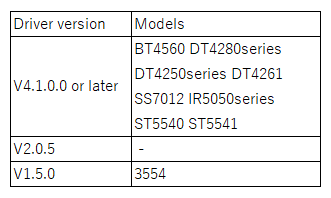
Models
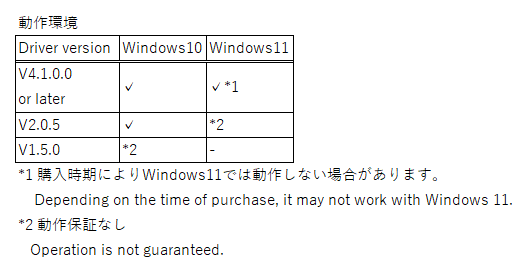
Operating System
Installation procedure
1.Click [Download] and download the file.
2.Decompress the downloaded file.
3.Double click the decompressed file and follow the instructions appearing on the screen.
4.When appearing the User Account Control screen, select [Yes] or [Allow] to continue.
5.Click [Next] to continue.
6.Confirm that the setup is completed and then click [Finish] to close the wizard.
Uninstallation procedure
1.Execute the file that you downloaded for installation.
2.Choose [Remove], and click [Next].
3.Click [Yes] to continue.
4.If completed successfully, click [Finish] to close the wizard.
Note
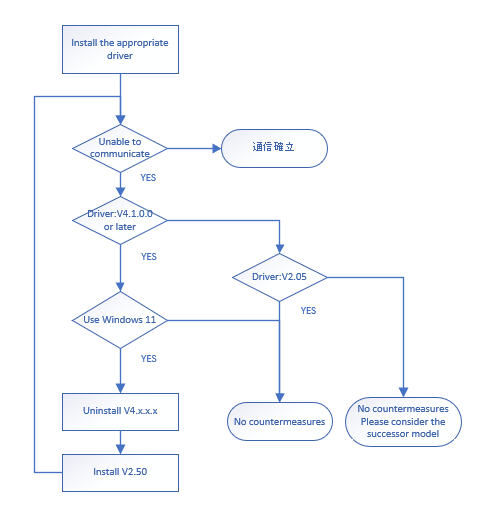
If it does not work after installing the appropriate USB driver, follow the flowchart below.
Version Upgrade History
2024/6/21 V4.2.1.0
*Latest version available for download
2024/5/31
*Driver version changes for ST5540 and ST5541
2024/4/26
*Supported products added: IR5050 series
2023/8/31 V4.1.0.0
*Latest and previous versions available for download
2020/2/28 V2.0.0
* The replacement to the latest version.
2016/4/22 V1.12.0
* For Windwos10
2014/2/14 V1.9.0
* For Windwos8.1
2013/5/31 V1.8.0
* The replacement to the latest version.
2012/12/18 V1.7.0
* For Windwos 8
V1.2.10
* For Windwos 7
V1.0.2.5
* For Windwos Vista
Contact Information
*HIOKI welcomes opinions, suggestions, operation reports, and bug reports. Please send such communications to the following address.
*HIOKI reserves the right to incorporate any suggestions and opinions received in its products without notice.
*E-mail: os-com@hioki.co.jp (International Sales Department)